SignKit
A desktop workflow for extracting handwritten signature images, cleaning them, and placing them into PDFs without requiring sensitive files to be uploaded to a server.
Primary user
People and small teams handling signature images inside sensitive, file-heavy document workflows.
My role
Product owner and hands-on builder across workflow design, desktop UX, image processing, PDF handling, packaging, and sales iteration.
Current outcome
Moved from a recurring workflow problem to a paid desktop product with early customer validation.
Visual evidence
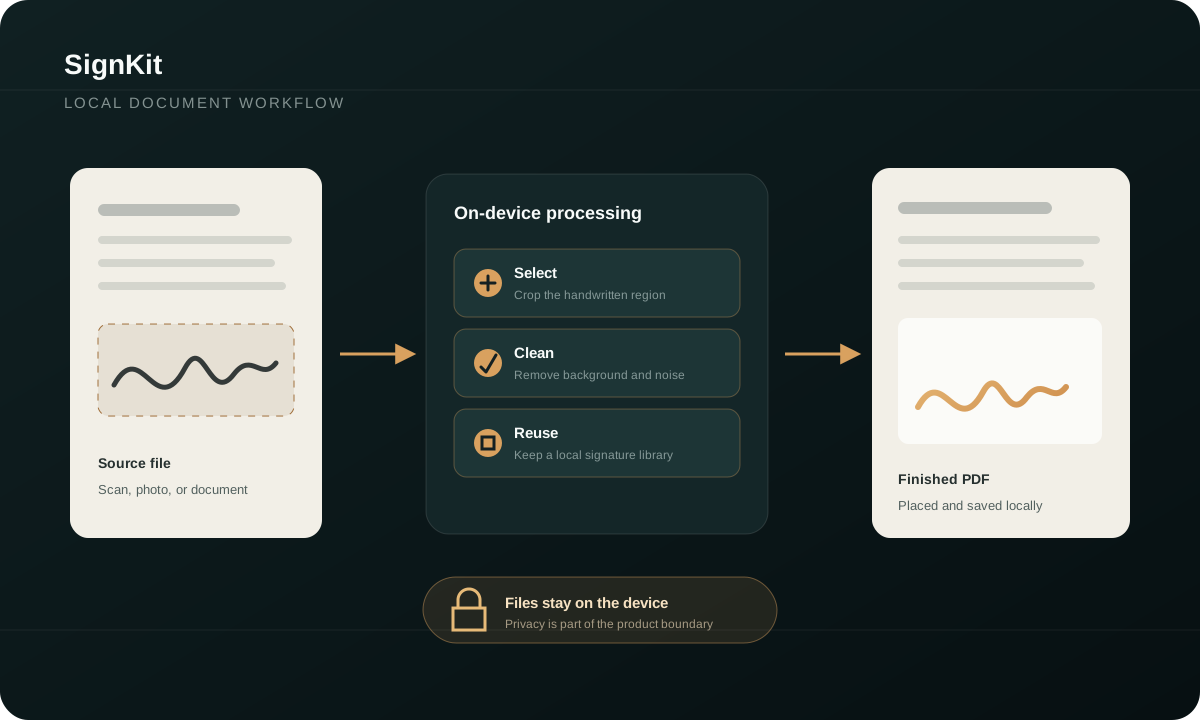 Workflow map
Inspectable implementation evidence
Follow the claim into source, tests, or architecture.
Links are pinned to the source revision reviewed for this case study: 0bbda3ddc32b.
Desktop application entry point
Qt application boot, startup state, and native desktop lifecycle.
Extraction workflow implementation
Current extraction-facing desktop workflow and state handling.
PDF feature tests
Executable checks around the PDF workflow rather than a marketing-only claim.
Coordinate-mapping tests
Tests for mapping placement coordinates between the product surface and PDF space.
What exists now
Current implementation boundary
This list is intentionally narrower than a product roadmap. It describes the current working surface used for this case study.
Local desktop file handling
Signature-image extraction and cleanup
PDF placement workflow
Cross-platform Python/Qt application surface
Commercial distribution and customer feedback loop
Key product decisions
Judgment is more useful than a technology list.
Keep document processing local.
The workflow involves sensitive PDFs and direct filesystem access; privacy and user control are part of the product value.
Trade-off
Desktop packaging, updates, and platform-specific behaviour are harder than a web uploader.
Treat signatures as visual assets, not certified e-signatures.
The product solves extraction and placement. It does not claim identity verification or legal-signature certification.
Trade-off
The scope stays honest and useful, but excludes regulated e-signature verification.
Constraints
- No cloud upload as the default workflow
- Imperfect scans, photos, and mixed backgrounds
- Desktop reliability for non-technical users